
솔직히 이거랑 평범하게 API 호출하는 앱이랑 무슨 차이인지 잘모르겠다. 솔직히 기술적으로 큰 차이를 못느끼겠다. 아무래도 LLM 이라 벡엔드 퀄리티가 높으니 재미는 있긴한데... 모델튜닝도 마찬가지고 퀄리티 좋게하는게 노가다라는건 늘 그랬고...
머릿속에 그리던거랑 큰차이 없긴한데 실제로 해보는 것이 의미가 있긴하니까 재미 있는 장난감이라 생각하고 꾸준히 진행해봐야겠다. 역시 날로 먹는건 어렵구나. 특별한건 없고 간단하게 스킬 구현하고 동기식 루프 정도?; 기본적으로 다 교체 가능하게 구조 짜놨으니 LLM 자동 스위칭이나 스킬 작성 개선, 같은 기능들 구현하면 헤르메스나 요즘 새로 출시된 아키텍처인데.. 솔직히 여기에 뭐 특별한게 있나? 아이디어도 평범하고 기술도 평범하다. 그저 노가다로 올린 퀄리티가 유의미할뿐.

이를 활용해서 코드를 작성해보면

[2026-06-27T22:32:13.824Z] [INFO] [App Initialization] Starting Brain Harness Application Engine...
[2026-06-27T22:32:13.828Z] [INFO] [App Initialization] Initializing Configuration-Driven Model Managers...
[2026-06-27T22:32:13.828Z] [INFO] [App Initialization] Loaded Agent Skills: [file, run]
[2026-06-27T22:32:13.828Z] [INFO] [App Initialization] Brain Harness MVP Core System Ready.
[2026-06-27T22:35:17.047Z] [INFO] [User Request Ingested] Swapping context to [Role: coder] | Data: {
  "userInput": "./main.js 파일을 만들어서 react +canvas로 비오는날 연못을 보여주는 로직을 작성해줘"
}
[2026-06-27T22:35:17.051Z] [INFO] [Harness Started] Initializing task for role: coder | Data: {
  "templateId": "code-generation"
}
[2026-06-27T22:36:04.976Z] [INFO] [Harness Success] Output cleared guardrails successfully. | Data: {
  "roleId": "coder",
  "retryCount": 0
}
[2026-06-27T22:36:04.976Z] [INFO] [Tool Call Intercepted] Model requested action.
[2026-06-27T22:36:04.977Z] [INFO] [Tool Execution] Executing Skill: file -> writeFileAsync
[2026-06-27T22:36:04.979Z] [INFO] [Tool Execution] Feeding results back to model for next step.
[2026-06-27T22:36:04.979Z] [INFO] [User Request Ingested] Swapping context to [Role: coder] | Data: {
  "userInput": "[TOOL EXECUTION RESULTS]\n[\n  {\n    \"skill\": \"file\",\n    \"function\": \"writeFileAsync\",\n    \"success\": true\n  }\n]\n\nReview these results and next task."
}
[2026-06-27T22:36:04.981Z] [INFO] [Harness Started] Initializing task for role: coder | Data: {
  "templateId": "code-generation"
}
[2026-06-27T22:36:20.187Z] [INFO] [Harness Success] Output cleared guardrails successfully. | Data: {
  "roleId": "coder",
  "retryCount": 0
}
[2026-06-27T22:38:13.717Z] [INFO] [User Request Ingested] Swapping context to [Role: coder] | Data: {
  "userInput": "이걸 설치 없이 간단히 확인해볼려면 무슨 사이트를 활용하는게 좋을까?"
}
[2026-06-27T22:38:13.719Z] [INFO] [Harness Started] Initializing task for role: coder | Data: {
  "templateId": "code-generation"
}
[2026-06-27T22:38:38.011Z] [INFO] [Harness Success] Output cleared guardrails successfully. | Data: {
  "roleId": "coder",
  "retryCount": 0
}
간단한 작업을 시키고 로그를 긁어와봤다. 작성한 코드는 아래와 같다.
import React, { useEffect, useRef } from 'react';

const RainyPond = () => {
  const canvasRef = useRef(null);

  useEffect(() => {
    const canvas = canvasRef.current;
    const ctx = canvas.getContext('2d');
    let animationFrameId;

    // Resize canvas to fill window
    const resizeCanvas = () => {
      canvas.width = window.innerWidth;
      canvas.height = window.innerHeight;
    };

    window.addEventListener('resize', resizeCanvas);
    resizeCanvas();

    // Constants
    const rainCount = 150;
    const pondY = canvas.height * 0.7; // Pond starts at 70% of height
    const rainParticles = [];
    const ripples = [];

    // Rain Particle Class
    class RainParticle {
      constructor() {
        this.init();
      }

      init() {
        this.x = Math.random() * canvas.width;
        this.y = Math.random() * -canvas.height;
        this.length = Math.random() * 20 + 10;
        this.speed = Math.random() * 10 + 10;
        this.opacity = Math.random() * 0.5 + 0.2;
      }

      draw() {
        ctx.beginPath();
        ctx.strokeStyle = `rgba(174, 194, 224, ${this.opacity})`;
        ctx.lineWidth = 1;
        ctx.moveTo(this.x, this.y);
        ctx.lineTo(this.x, this.y + this.length);
        ctx.stroke();
      }

      update() {
        this.y += this.speed;

        // Collision with pond surface
        if (this.y >= pondY) {
          ripples.push(new Ripple(this.x, pondY));
          this.init();
          this.y = -this.length; // Reset to top
        }

        // Reset if it goes off screen (though pond usually catches it)
        if (this.y > canvas.height) {
          this.init();
        }
      }
    }

    // Ripple Class
    class Ripple {
      constructor(x, y) {
        this.x = x;
        this.y = y;
        this.radius = 0;
        this.maxRadius = Math.random() * 30 + 20;
        this.opacity = 0.5;
        this.speed = 0.8;
      }

      draw() {
        ctx.beginPath();
        ctx.strokeStyle = `rgba(255, 255, 255, ${this.opacity})`;
        ctx.lineWidth = 1;
        ctx.ellipse(this.x, this.y, this.radius, this.radius * 0.3, 0, 0, Math.PI * 2);
        ctx.stroke();
      }

      update() {
        this.radius += this.speed;
        this.opacity -= 0.01;
      }
    }

    // Initialize rain
    for (let i = 0; i < rainCount; i++) {
      rainParticles.push(new RainParticle());
    }

    const render = () => {
      // Background: Sky and Pond
      const skyGradient = ctx.createLinearGradient(0, 0, 0, pondY);
      skyGradient.addColorStop(0, '#1a1a2e');
      skyGradient.addColorStop(1, '#16213e');
      ctx.fillStyle = skyGradient;
      ctx.fillRect(0, 0, canvas.width, pondY);

      const pondGradient = ctx.createLinearGradient(0, pondY, 0, canvas.height);
      pondGradient.addColorStop(0, '#0f3460');
      pondGradient.addColorStop(1, '#051937');
      ctx.fillStyle = pondGradient;
      ctx.fillRect(0, pondY, canvas.width, canvas.height - pondY);

      // Update and draw ripples
      for (let i = ripples.length - 1; i >= 0; i--) {
        ripples[i].update();
        ripples[i].draw();
        if (ripples[i].opacity <= 0) {
          ripples.splice(i, 1);
        }
      }

      // Update and draw rain
      rainParticles.forEach(particle => {
        particle.update();
        particle.draw();
      });

      animationFrameId = requestAnimationFrame(render);
    };

    render();

    return () => {
      window.removeEventListener('resize', resizeCanvas);
      cancelAnimationFrame(animationFrameId);
    };
  }, []);

  return (
    <canvas
      ref={canvasRef}
      style={{
        display: 'block',
        backgroundColor: '#000',
        margin: 0,
        padding: 0,
        overflow: 'hidden',
        width: '100vw',
        height: '100vh'
      }}
    />
  );
};

export default RainyPond;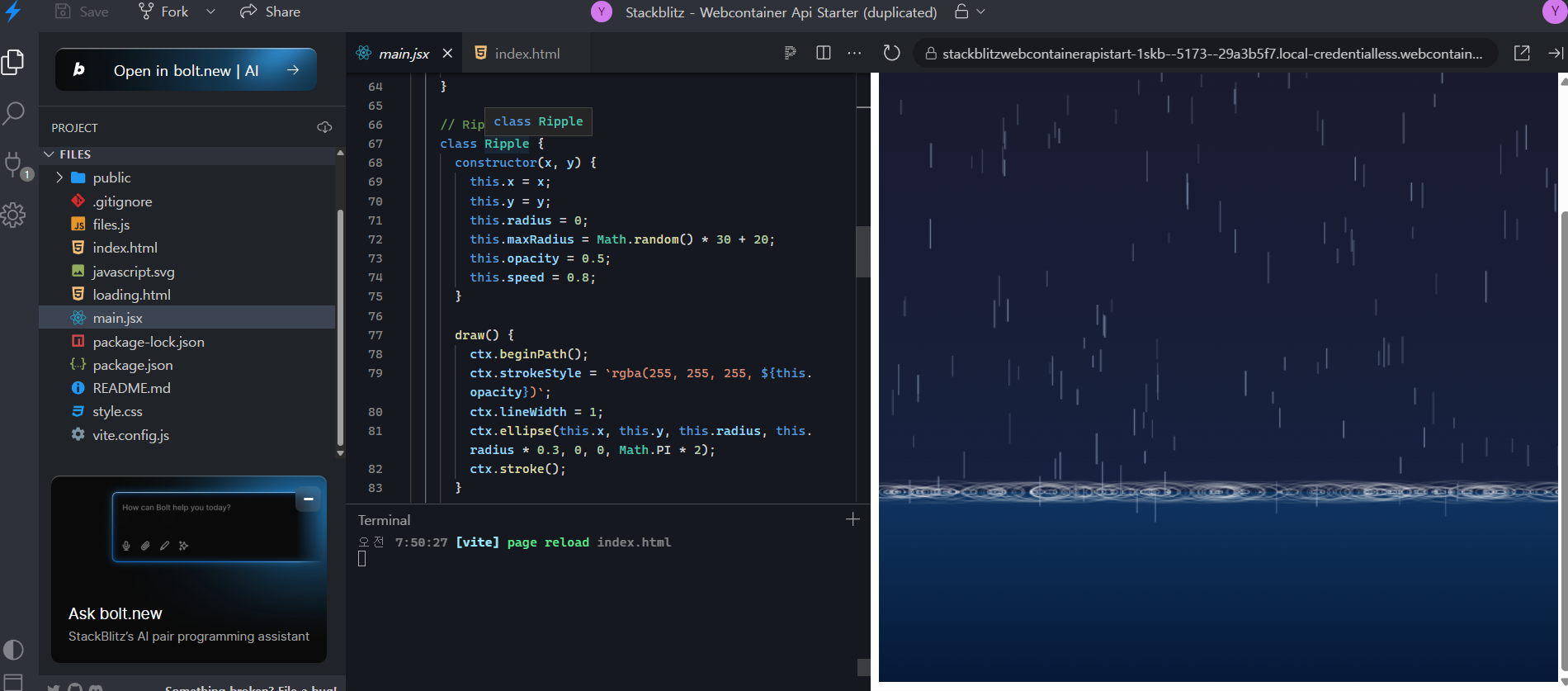
파일 같은 것을 읽은 내용물이 필요하면 피드백루프를 돌리고, 단순히 여러 스킬을 순차적으로 호출해야하면 스킬루프를 돌리는 구조.
반응형
'프로젝트' 카테고리의 다른 글
| [brain]하네스 엔지니어링(에이전트) 기록 -3- (0) | 2026.06.29 |
|---|---|
| [brain]하네스 엔지니어링(에이전트) 기록 -2- (0) | 2026.06.28 |
| [디자인시스템]AsharyuDesign- Docs (0) | 2026.06.18 |
| 인디게임 만들어보기 -1- (0) | 2026.06.16 |
| ABILITY: DaoXin(도심) 구글플레이 스토어 출시 완료. (0) | 2026.06.04 |


